AI Agent Skill Traceability in UX Design
Trace an Import Leads CRM screen from visible UX decisions back to the exact AI Agent Skill excerpts that shaped it.
Imagine you are building an Import Leads screen for an in-house CRM. The page has a narrow job: let users paste or upload raw lead text, split it into importable chunks, preview those chunks, and submit up to 250 raw lead evidence records with an optional source name.
After import, the workflow reports how many chunks were created and sends users to My Pipeline for review and processing. It is not a landing page. It is an operational tool, so the page should feel quiet, compact, and ready for repeat use.
The Screen
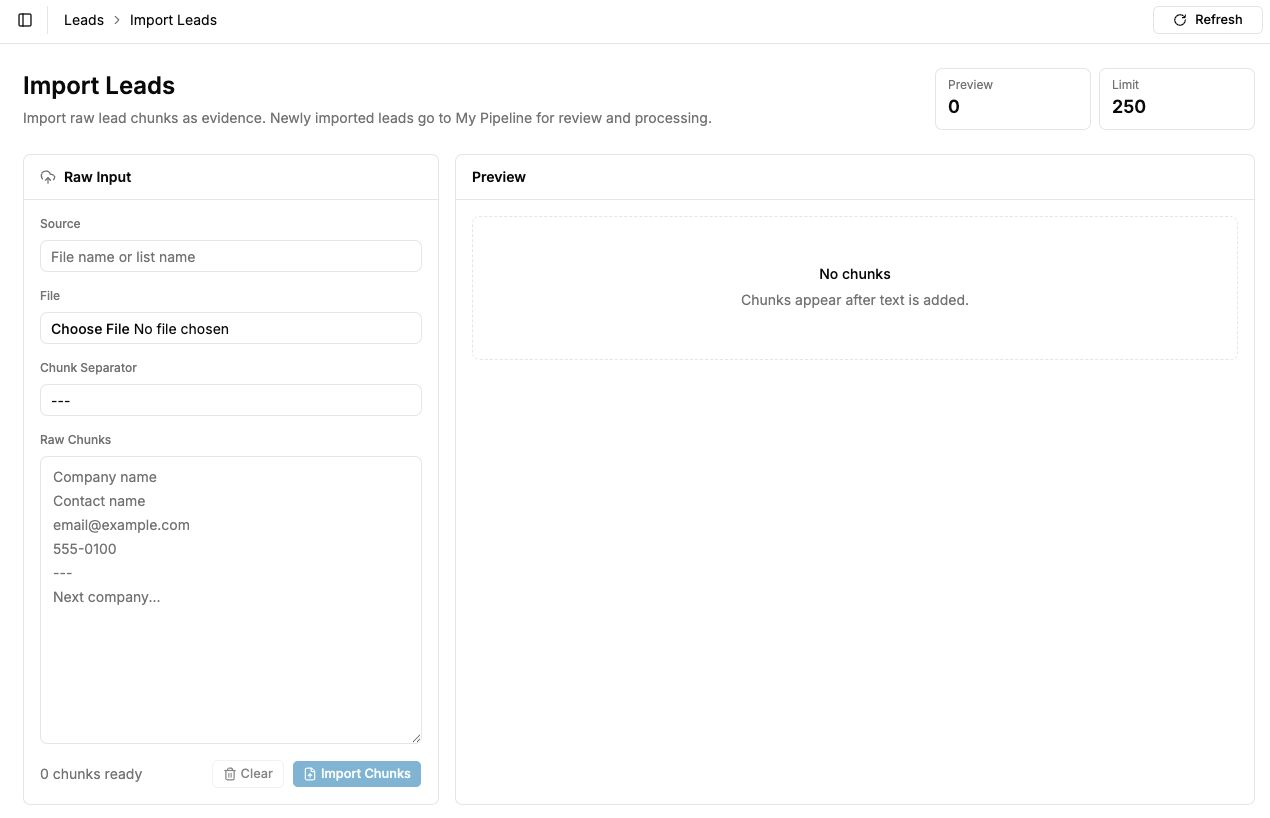
The screenshot shows a page header, short summary, two metric tiles, and two work areas. The left panel is Raw Input: source name, file chooser, chunk separator, raw chunk text, and import actions. The right panel is Preview: an empty state until chunks exist.
The interface is intentionally modest. The Preview count starts at zero. The Limit tile is fixed at 250. The Import Chunks button stays disabled until the user provides chunkable content. Those choices are small, but they carry product rules that a coding agent should not rediscover from scratch.
The Agent Prompt
The useful follow-up was not "make it prettier." The useful follow-up asked the agent to audit its own skill usage:
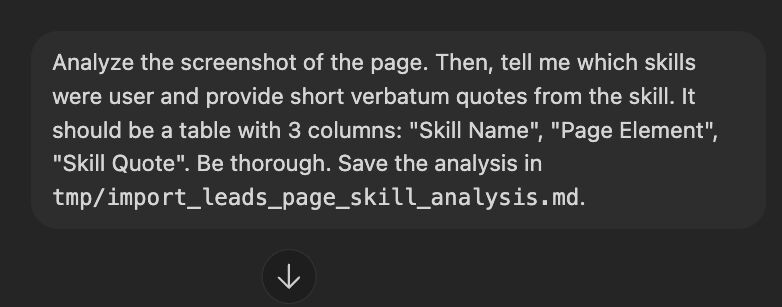
That prompt turns the generated UI into a testable artifact. If the agent can point from a visible element to a specific skill quote, then the skill is doing real work. If it cannot, the missing quote is a signal that the skill needs better instructions.
The Skill Trace
The report maps page decisions to the skill excerpts that shaped them. This is the kind of evidence that makes AI agent work reviewable instead of mysterious.
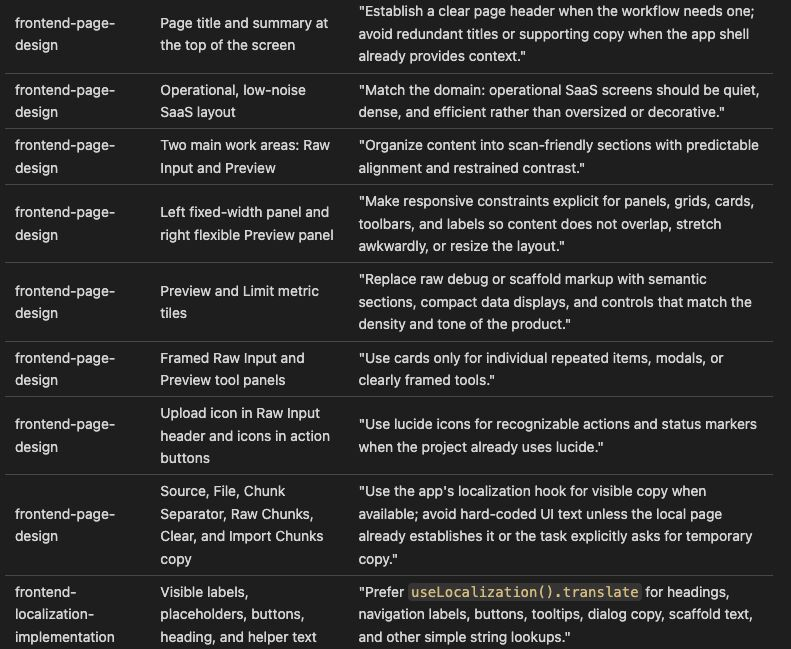
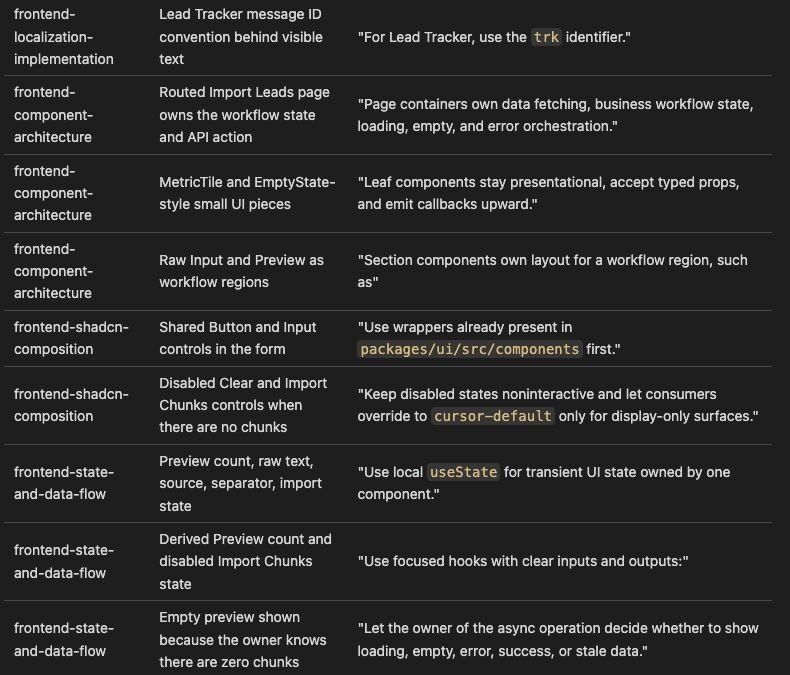
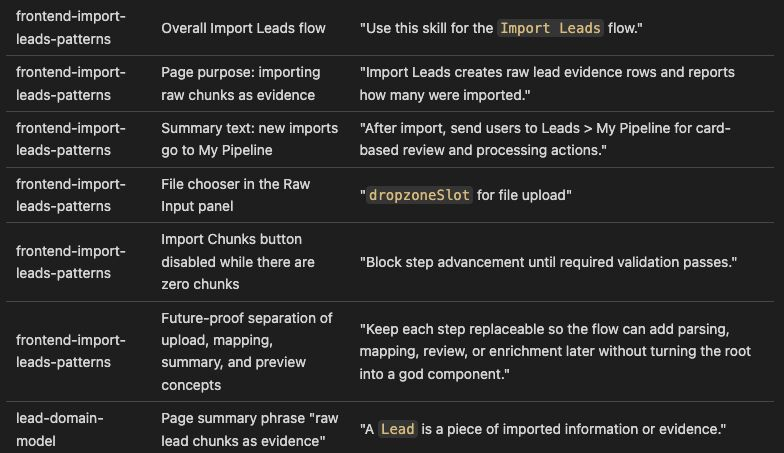
The same trace is also useful as structured text. It gives reviewers and crawlers a direct map from page element to skill excerpt.
| Skill Name | Page Element | Skill Quote |
|---|---|---|
| frontend-page-design | Page title and summary at the top of the screen | "Establish a clear page header when the workflow needs one; avoid redundant titles or supporting copy when the app shell already provides context." |
| frontend-page-design | Operational, low-noise SaaS layout | "Match the domain: operational SaaS screens should be quiet, dense, and efficient rather than oversized or decorative." |
| frontend-page-design | Two main work areas: Raw Input and Preview | "Organize content into scan-friendly sections with predictable alignment and restrained contrast." |
| frontend-page-design | Left fixed-width panel and right flexible Preview panel | "Make responsive constraints explicit for panels, grids, cards, toolbars, and labels so content does not overlap, stretch awkwardly, or resize the layout." |
| frontend-page-design | Preview and Limit metric tiles | "Replace raw debug or scaffold markup with semantic sections, compact data displays, and controls that match the density and tone of the product." |
| frontend-page-design | Framed Raw Input and Preview tool panels | "Use cards only for individual repeated items, modals, or clearly framed tools." |
| frontend-page-design | Upload icon in Raw Input header and icons in action buttons | "Use lucide icons for recognizable actions and status markers when the project already uses lucide." |
| frontend-page-design | Source, File, Chunk Separator, Raw Chunks, Clear, and Import Chunks copy | "Use the app's localization hook for visible copy when available; avoid hard-coded UI text unless the local page already establishes it or the task explicitly asks for temporary copy." |
| frontend-localization-implementation | Visible labels, placeholders, buttons, heading, and helper text | "Prefer useLocalization().translate for headings, navigation labels, buttons, tooltips, dialog copy, scaffold text, and other simple string lookups." |
| frontend-localization-implementation | Lead Tracker message ID convention behind visible text | "For Lead Tracker, use the trk identifier." |
| frontend-component-architecture | Routed Import Leads page owns workflow state and API action | "Page containers own data fetching, business workflow state, loading, empty, and error orchestration." |
| frontend-component-architecture | MetricTile and EmptyState-style small UI pieces | "Leaf components stay presentational, accept typed props, and emit callbacks upward." |
| frontend-component-architecture | Raw Input and Preview as workflow regions | "Section components own layout for a workflow region" |
| frontend-shadcn-composition | Shared Button and Input controls in the form | "Use wrappers already present in packages/ui/src/components first." |
| frontend-shadcn-composition | Disabled Clear and Import Chunks controls when there are no chunks | "Keep disabled states noninteractive and let consumers override to cursor-default only for display-only surfaces." |
| frontend-state-and-data-flow | Preview count, raw text, source, separator, import state | "Use local useState for transient UI state owned by one component." |
| frontend-state-and-data-flow | Derived Preview count and disabled Import Chunks state | "Use focused hooks with clear inputs and outputs:" |
| frontend-state-and-data-flow | Empty preview shown because the owner knows there are zero chunks | "Let the owner of the async operation decide whether to show loading, empty, error, success, or stale data." |
| frontend-import-leads-patterns | Overall Import Leads flow | "Use this skill for the Import Leads flow." |
| frontend-import-leads-patterns | Page purpose: importing raw chunks as evidence | "Import Leads creates raw lead evidence rows and reports how many were imported." |
| frontend-import-leads-patterns | Summary text: new imports go to My Pipeline | "After import, send users to Leads > My Pipeline for card-based review and processing actions." |
| frontend-import-leads-patterns | File chooser in the Raw Input panel | "`dropzoneSlot` for file upload" |
| frontend-import-leads-patterns | Import Chunks button disabled while there are zero chunks | "Block step advancement until required validation passes." |
| frontend-import-leads-patterns | Future-proof separation of upload, mapping, summary, and preview concepts | "Keep each step replaceable so the flow can add parsing, mapping, review, or enrichment later without turning the root into a god component." |
| lead-domain-model | Page summary phrase "raw lead chunks as evidence" | "A Lead is a piece of imported information or evidence." |
Why This Matters
A screenshot review like this catches two kinds of problems. First, it catches UI drift. If a page becomes decorative, overly spacious, or hard to scan, the page-design skill gives the reviewer exact language to bring it back to the product's operating style.
Second, it catches weak skills. If an agent can say "I used frontend state management" but cannot quote the skill that governed preview count, disabled import behavior, or empty-state ownership, then the skill is not specific enough yet. Improve the skill until the next generated screen can explain itself.
The Better Loop
The Import Leads screen is a small example, but the loop scales. Build the screen. Ask the agent to map visible elements back to skill excerpts. Strengthen any skill that cannot be cited. Then generate or review the next screen with better product memory than the previous one.
That is how an AI coding agent becomes less like a one-off page generator and more like a teammate that carries your product rules forward.