Agentic AI Systems with Browser Extensions
Explore how a Manifest V3 browser extension connects LinkedIn profile collection with a local AI agent and Lead Tracker.
Consider the experience of building a Chrome extension as part of an agentic AI system. The example in this article is a lead generation tool that collects profile data from LinkedIn and sends it to a locally running AI agent connected to a custom CRM called Lead Tracker.
The browser extension sits between a live web page and the local application. That position makes the manifest, runtime boundaries, message contracts, permissions, and validation workflow central to the design.
Browser Extension Manifest #
The manifest.json file is the extension's
blueprint. It tells the browser which files to load, which user interfaces to expose, which pages receive content
scripts, and which permissions the extension requests.
{
  "name": "BizDevStack Lead Tracker LinkedIn",
  "description": "Captures known LinkedIn person and company profiles and attaches the raw profile text to Lead Tracker records.",
  "version": "0.1.20",
  "manifest_version": 3,
  "icons": {
    "16": "icons/icon-16.png",
    "32": "icons/icon-32.png",
    "48": "icons/icon-48.png",
    "128": "icons/icon-128.png"
  },
  "action": {
    "default_popup": "popup.html",
    "default_title": "BizDevStack Lead Tracker LinkedIn",
    "default_icon": {
      "16": "icons/icon-16.png",
      "32": "icons/icon-32.png",
      "48": "icons/icon-48.png",
      "128": "icons/icon-128.png"
    }
  },
  "background": {
    "service_worker": "background.js"
  },
  "content_scripts": [
    {
      "matches": [
        "https://www.linkedin.com/*",
        "https://linkedin.com/*"
      ],
      "js": [
        "extension_logger.js",
        "content_scripts/content_script_log_formatter.js",
        "content_scripts/linkedin_profile_text.js",
        "content_scripts/content_script_messages.js",
        "content_scripts/linkedin_profile_url.js",
        "content_scripts/runtime_client.js",
        "content_scripts/linkedin_profile_extractor.js",
        "content_scripts/linkedin_collect_control.js",
        "content_scripts/lead_tracker_linkedin_observer.js",
        "content_scripts/linkedin_button_only_observer.js",
        "content_script.js"
      ],
      "run_at": "document_idle"
    }
  ],
  "options_ui": {
    "page": "options.html",
    "open_in_tab": false
  },
  "permissions": ["storage"],
  "host_permissions": [
    "https://www.linkedin.com/*",
    "https://linkedin.com/*",
    "https://localhost/*",
    "http://localhost/*",
    "https://127.0.0.1/*",
    "http://127.0.0.1/*"
  ]
}
Metadata and Basics #
These keys define the extension's identity and platform version.
-
nameanddescriptionidentify the extension in the browser's extension management interface and, when published, its store listing. -
versionrecords the extension release as0.1.20. -
manifest_versiondeclares Manifest V3, which uses an extension service worker for background coordination. -
iconsprovides the image assets used in the toolbar, extension menu, management interface, and store listing.
User Interface #
The action object controls the toolbar
entry. Its default_popup opens
popup.html when the user selects the
extension icon. The default_title provides
the toolbar tooltip.
The options_ui object declares
options.html as an embedded options page.
With open_in_tab set to
false, Chrome embeds the page in
chrome://extensions instead of opening a
new tab.
The Popup Action Window #
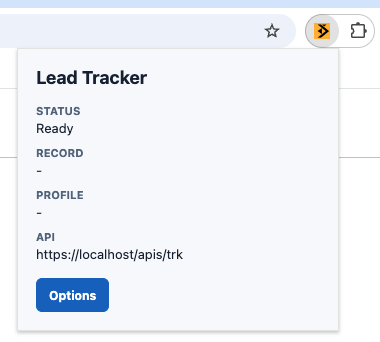
The popup is for quick, frequent actions. In this lead tracker, it shows connection state and provides controls for collecting the current LinkedIn profile. It is temporary. Closing the popup destroys its page state, so durable state belongs in extension storage or another persistent application boundary.
The Options Settings Page #
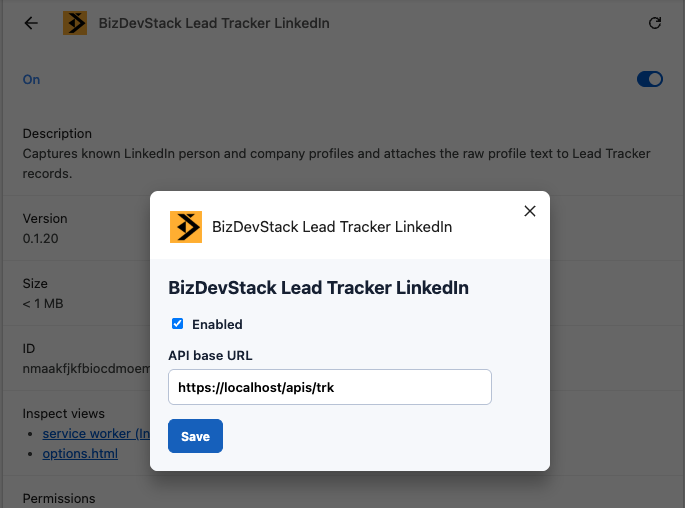
The options page is for infrequent setup. It gives the user a persistent place to configure the Lead Tracker address,
connection behavior, and related settings. The popup can call
chrome.runtime.openOptionsPage() to open
this interface.
Background Service Worker #
The background.service_worker entry names
background.js as the extension's central
event coordinator. It can listen for extension events, receive messages, access extension storage, and make requests to
permitted local Lead Tracker hosts.
A Manifest V3 service worker is event-driven. Chrome can terminate it after a period of inactivity and start it again
when an event arrives. Durable state must therefore live in
chrome.storage or another persistent data
store, not only in global variables.
| Feature | Extension Service Worker | Content Scripts |
|---|---|---|
| Where it runs | In an extension worker context, separate from any web page. | In an isolated JavaScript world associated with each matched page. |
| Lifecycle | Starts for events and can stop after becoming idle. | Loads for a matching document and ends when that document is discarded. |
| Page access | Has no direct access to a page DOM. | Can read and modify the shared page DOM while keeping JavaScript variables isolated. |
| Primary role | Coordinates extension events, storage, messages, and permitted network requests. | Discovers page state, extracts profile data, and adds page-level controls. |
On a page outside the declared LinkedIn match patterns, the content scripts are not injected. The extension's popup, options page, and service worker remain separate extension surfaces. An event directed to the service worker can start it even though the active page does not receive LinkedIn-specific code.
On a matched LinkedIn page, a content script can extract and normalize a profile, package the result in a message, and
send it through chrome.runtime.sendMessage().
The service worker can then validate the payload, store required state, and deliver the record to the local Lead
Tracker service.
Content Scripts #
The content_scripts array defines the code
that Chrome injects into matching pages. The manifest reveals several useful contracts:
-
matcheslimits automatic injection to the declared LinkedIn URL patterns. -
jslists the JavaScript files in load order. Shared logging, formatting, message, and runtime helpers load before the extractor and observers that depend on them. -
run_atusesdocument_idle, which lets Chrome choose an injection time after the document is loaded enough for the scripts to work with its DOM.
Filenames suggest responsibilities, but they do not prove behavior. Before changing the extension, inspect the actual modules and trace their dependencies. The likely split is profile text extraction, URL normalization, runtime messaging, injected collection controls, and observers that respond to LinkedIn's client-side navigation.
Permissions #
The permission fields define which browser capabilities and hosts the extension can use.
-
"permissions": ["storage"]enables the Chrome storage API for durable extension settings and state. -
content_scripts.matchesdeclares the hosts where the listed content scripts can run automatically. -
host_permissionsgrants host access needed for capabilities such as cross-origin requests from extension pages or the service worker. Here it covers LinkedIn and local HTTP or HTTPS services onlocalhostand127.0.0.1.
AI Agent Skills #
The manifest is a useful starting point for an AI agent. It describes extension entry points, permissions, assets, script load order, and allowed hosts. It does not capture the complete implementation workflow or the engineering decisions behind the extension.
Those decisions can be packaged in an AI Agent Skill named
chrome-extension-implementation. The skill
gives the agent reusable instructions for creating, updating, debugging, and reviewing the Lead Tracker extension.
Purpose and Scope #
When to Use the Skill #
The skill should state which tasks require its guidance.
Use this skill when creating, updating, debugging, or reviewing the Lead Tracker Chrome extension. This includes changes to
manifest.json, popup and options pages, the extension service worker, content scripts, message contracts, browser storage, permissions, and the local Lead Tracker API integration.
Expected Outcome #
The skill should define what successful implementation looks like.
Produce the smallest complete change that follows Manifest V3 requirements, preserves existing runtime boundaries, reuses project message contracts, limits permissions, and passes the extension validation workflow.
Sources of Truth #
Browser Extension Manifest #
The skill should tell the agent how to interpret the manifest before changing code.
Read
manifest.jsonbefore editing the extension. Treat it as the source of truth for extension pages, the service worker, content script registration, script load order, permissions, host access, icons, and extension metadata.Do not add, remove, rename, or reorder a manifest entry without checking every file and runtime contract that depends on it.
Existing Project Contracts #
The manifest does not describe internal data structures. The skill should direct the agent to the code that does.
Search the existing code for message names, payload shapes, storage keys, profile data fields, logging utilities, and Lead Tracker request formats before introducing a new contract. Reuse an established contract when it already represents the task.
Runtime Architecture #
Popup and Options Pages #
Keep frequent, page-specific actions in
popup.html. Keep backend URLs, connection settings, data mapping rules, and other infrequent configuration inoptions.html. Persist required configuration through the project's browser storage abstraction instead of relying on page memory.
Extension Service Worker #
Register Chrome event listeners at the top level of the service worker. Assume the worker can stop when idle and restart for a later event. Store durable state in
chrome.storageinstead of relying on global variables or a continuously running background process.
Content Scripts #
Run LinkedIn extraction logic only on manifest-approved URLs. Preserve the declared content script order because shared utilities and message clients must load before the extractor and page observers.
Keep DOM discovery, profile extraction, data normalization, and UI control injection in separate modules. Handle LinkedIn client-side navigation without creating duplicate observers, controls, or event handlers.
Messaging and Data Flow #
Message Contracts #
Give every message a stable type, a documented payload shape, and a structured success or error response. Validate messages before processing them. Reuse the project's runtime client and message helpers instead of creating a second communication path.
Lead Tracker Integration #
Let the content script extract and normalize LinkedIn profile data. Send the resulting record to the service worker through extension messaging. Let the service worker handle browser storage and requests to the configured Lead Tracker endpoint.
Security and Permissions #
Permission Review #
Add a Chrome API permission or host pattern only when the implementation requires it. Keep LinkedIn and local Lead Tracker host patterns as narrow as the feature allows. Explain every permission change and include it in the validation summary.
Sensitive Data #
Do not expose Lead Tracker connection settings to the LinkedIn page. Do not write API credentials or complete profile payloads to production logs. Validate data before storing it or sending it to the local service.
Implementation Workflow #
Before Editing #
Inspect
manifest.jsonand the files involved in the requested runtime path. Trace the current flow from the user action to profile extraction, extension messaging, storage, and the Lead Tracker request before proposing changes.
During Implementation #
Keep the change focused on the requested behavior. Preserve existing file boundaries, naming conventions, logging patterns, and message helpers. Do not broaden permissions or refactor unrelated extension code.
Validation #
Validate the manifest and run the project's automated checks. Load the unpacked extension in Chrome and inspect service worker errors. Verify the popup and options pages, LinkedIn profile navigation, duplicate-control prevention, successful Lead Tracker delivery, failure handling, and the final permission diff.
Prompt Contrast #
These prompts show how reusable skill guidance changes the context an AI agent receives for the same implementation goal.
Simple Prompt #
The simple prompt supplies a goal and points to the manifest, but the agent must infer the project's architecture and quality requirements.
Analyze `manifest.json` and build the Lead Tracker Chrome extension.Skill-Aware Prompt #
The advanced prompt stays concise because the
chrome-extension-implementation skill
contains the detailed implementation and validation guidance.
Use the `chrome-extension-implementation` skill to analyze `manifest.json` and build
the Lead Tracker Chrome extension. Preserve the runtime boundaries, message contracts,
permission rules, and validation workflow defined by the skill.
Conclusion #
A browser extension can connect a user's browser workflow with a locally running AI agent and a specialized business application such as Lead Tracker. The manifest defines the extension's visible structure. A reliable implementation also depends on clear runtime boundaries, stable message contracts, narrow permissions, and repeatable validation.
The chrome-extension-implementation skill
turns those engineering decisions into durable guidance. The simple prompt shows how an agent can begin from the
manifest alone. The skill-aware prompt gives the agent the project context needed to produce safer, more consistent
changes.
As the extension evolves, the skill can evolve with it. New extraction rules, message types, security requirements, and validation steps can be added once and reused across future implementation, debugging, and review tasks.